Ringtones for Android Phone
QR Code Scanner.Music & Audio
4.86.93K Reviews
- Version
- 1.5.5
- Installs
- 50.00M
- Age Rating
- Everyone
Screenshots
Our Review of Ringtones for Android Phone
 Analysis by Appyee
Hey there! So, I recently got my hands on this app called Ringtones for Android Phone, and I’ve been playing around with it for a bit. I figured I’d share my thoughts and experiences with you, especially if you’re someone who loves personalizing your phone with unique sounds.
What the free price does—and does not—tell you
The app is free to download, so you can try its ringtone-focused approach without paying upfront. There are also in-app purchases ranging from $1.99 to $49.99 per item. That makes the starting cost clear, but it doesn’t mean every sound or function is necessarily included at no charge. I’d explore the free experience first and only consider a purchase if you find something specific you genuinely want.
For me, that distinction matters more than a headline price. A free download is useful when I’m only looking for one or two fresh sounds, while a paid option is harder to justify if I’m not sure what it adds to my own routine. I wouldn’t treat the purchase range as a reason to spend; I’d treat it as a reason to check the app carefully before confirming anything.
What makes a ringtone app useful day to day
A ringtone is a tiny part of phone use, but it can solve a practical annoyance: when several phones are nearby, a familiar default tone makes it easy to mistake someone else’s call for yours. A distinctive sound can help. The value here is less about collecting dozens of clips and more about finding one that is easy to recognize without being grating after repeated calls.
I’d also think about where a sound will be heard. A dramatic or funny alert may be entertaining at home, but it can feel out of place in a quiet office, a classroom, or public transport. A sensible setup is to choose a restrained ringtone for general use and keep bolder sounds for a contact or alert where the extra personality is welcome. If you change sounds often, a favorites list can make those swaps less of a hunt.
A realistic way to try it without overdoing it
Imagine you’re waiting for an important call and keep checking your phone because nearby devices use similar tones. I’d browse for a short, distinct sound, listen with the phone volume at a realistic level, and then use it for a day before deciding whether it works. A clip that sounds amusing in a preview may be too sharp when it interrupts a conversation or rings several times in a row.
That small test is also a good way to judge whether a sound has a clear beginning and remains recognizable in a noisy place. I wouldn’t choose only by how surprising it is in the first listen. The best everyday option is usually one I can identify quickly and still tolerate after hearing it repeatedly.
First Impressions: User Interface and Design
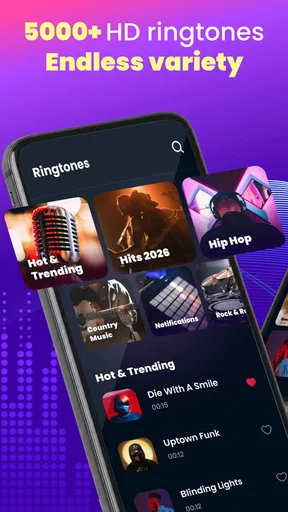
Right off the bat, the user interface is pretty clean and straightforward. As soon as you open the app, you’re greeted with a vibrant display of categories ranging from classic tunes to the latest hits. It’s super easy to navigate, which is always a plus in my book. You won't find yourself lost in a sea of options, which is often the case with similar apps.
Browsing Through the Categories
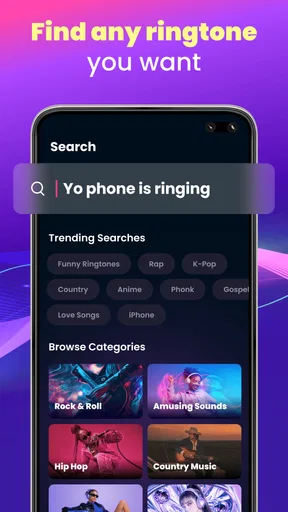
This is where Ringtones for Android Phone really shines. The app offers a staggering variety of categories. Whether you’re into pop, rock, jazz, or even quirky sound effects like animal noises or sci-fi blips, there’s something here for everyone. I was particularly impressed by the ‘Top Downloads’ section, which gives you a quick snapshot of what’s trending among other users.
One fun feature I found was the ‘Random’ button. Feeling adventurous? Just tap it, and you’ll be surprised with a random ringtone. It’s a neat way to discover new sounds you might not have considered before.
How discovery compares with familiar alternatives
The usual alternatives are to keep the phone’s built-in tones, search for an audio file elsewhere, or make a clip yourself. Built-in choices are the simplest and avoid the extra step of browsing another catalog, but they can feel limited if you want a sound with more character. Finding files independently may offer more control over the exact audio you use, though it puts the work of locating and organizing clips on you.
This app’s appeal, as I see it, is the guided browsing experience: categories and a random choice can help when you know you want something different but don’t have a particular sound in mind. That convenience won’t matter much if you already have a favorite audio file or prefer a carefully curated collection. I’d use the browsing tools to explore, not assume that a large selection automatically means every option will suit my taste.
Setting Up Your Ringtones
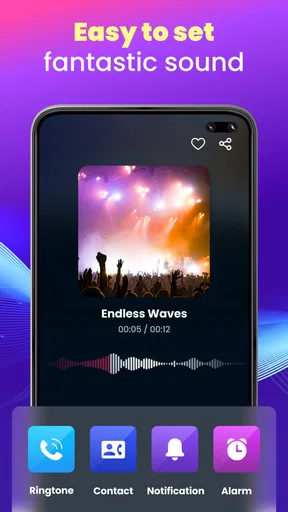
Setting up your favorite ringtones is a breeze. Once you’ve found a tune you like, you can easily assign it as your ringtone, notification sound, or even a specific contact’s alert. The app does a great job of integrating with your phone’s settings, so you don’t have to jump through hoops to get things set up. Plus, the sound quality is top-notch, which is crucial for any ringtone app.
Making a choice that stays practical
Before assigning a sound, I’d decide whether it is meant for calls, notifications, or one particular person. These are different jobs: a call tone needs to catch my attention for longer, while a notification sound should be brief enough not to become irritating every time a message arrives. A contact-specific alert can be useful when I need to recognize an important caller without checking the screen, but I’d reserve that distinction for a small number of people.
It’s worth listening to a candidate more than once before setting it permanently. A ringtone can seem pleasant at a low preview level and become harsh when played loudly, or its opening may be too quiet to notice. I’d also keep a familiar option available until I’m sure the new sound works in daily life. Personalization is useful only when the result is still easy to hear and identify.
Extra Features Worth Mentioning
Aside from the basics, the app offers some cool additional features. For instance, you can create your own ringtones from the music stored on your device. It’s a fun way to put a personal twist on your phone’s sounds. Plus, there’s a social aspect where you can share your favorite ringtones with friends or see what others are sharing in the community section.
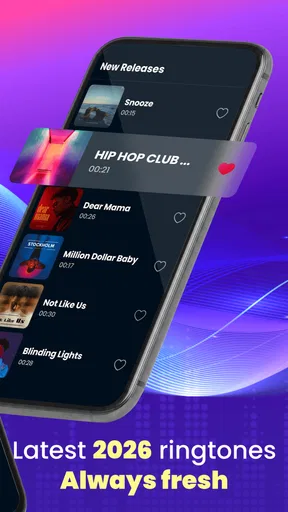
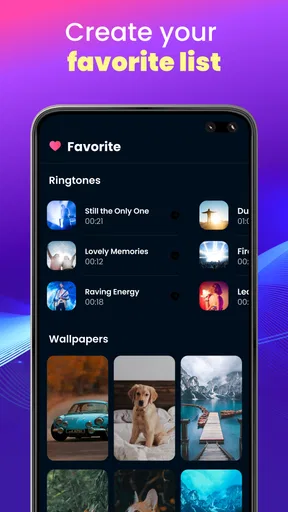
Another handy feature is the ability to save your favorite ringtones to a ‘Favorites’ list. It’s perfect for those times when you’re in the mood to switch things up without having to search all over again.
Using your own music thoughtfully
Creating a ringtone from music already on the phone is a different kind of convenience from browsing ready-made sounds. It can make sense if you have a particular track in mind, but a song is not automatically a good alert. I’d choose a section that is recognizable quickly and avoid a long lead-in; otherwise, the call may be missed before the part I recognize arrives. A short, clear excerpt tends to be more practical than simply using the beginning of a favorite song.
Favorites can help keep this experimentation manageable. I’d save a few distinct options rather than every sound that catches my attention, then use names or categories as a mental guide: a calm everyday tone, a louder alternative, and perhaps a playful choice for a specific contact. That way, switching sounds becomes a deliberate choice instead of repeatedly searching through everything.
Performance and Usability
Let’s talk performance. The app runs smoothly with no noticeable lag, which is essential for any app you’ll be using frequently. I didn’t encounter any crashes or bugs during my time testing it, which is always a relief. The developers seem committed to providing regular updates, which is a good sign for the app’s longevity.
Who is likely to get the most from it?
I’d recommend it most to someone who enjoys changing phone sounds, wants to browse instead of hunting for audio files manually, or likes the idea of using a personal music clip as an alert. It may also suit people who want separate sounds for a few contacts and enjoy trying options before settling on one. The app is in the music and audio category, is developed by QR Code Scanner, and is rated for Everyone, so its basic purpose is easy to understand for a broad audience.
On the other hand, if you’re happy with your phone’s default tones, want a minimal setup, or already manage your own sound files, you may not get enough from another ringtone catalog to make it worth keeping. I’d also skip it if your only goal is a single specific sound and you can already set that sound through your phone’s built-in settings. In that case, the extra browsing may be unnecessary.
Scale, version, and a sensible decision
The app has a 4.7 average from around 163,000 ratings, with over 10 million installs and around 4,700 written reviews. Those figures suggest that many Android users have tried it, but popularity alone doesn’t tell me whether its sound selection fits my taste. I’d use my own first session to judge that rather than assuming a well-used app will automatically be right for me.
It was released on October 28, 2022, and the current version is 1.4.3, with Android 8.0 as the minimum operating-system requirement. If your phone meets that requirement, the practical question is whether you want the discovery and customization options enough to keep a separate app for them. I’d start with the free experience, test a sound in a real setting, and avoid buying anything until I know exactly what I’m getting from it.
Wrapping It Up
All in all, Ringtones for Android Phone is a solid choice for anyone looking to spice up their phone’s sound profile. Its user-friendly design, broad selection of ringtones, and additional features like ringtone creation make it stand out in a crowded market.
If you’re tired of the default sounds on your phone and want something that reflects your personality a bit more, give this app a shot. It’s free to download, so you really have nothing to lose. Happy ringing!
Privacy and Permissions
See what permissions an app requests and how it handles your data.
- Contacts
- read your contacts, modify your contacts
- Phone
- directly call phone numbers, read phone status and identity
- Photos/Media/Files
- read the contents of your USB storage, modify or delete the contents of your USB storage
- Storage
- read the contents of your USB storage, modify or delete the contents of your USB storage
- Wi-Fi connection information
- view Wi-Fi connections
- Device ID & call information
- read phone status and identity
- Other
- view network connections, full network access, run at startup, set wallpaper, draw over other apps, use accounts on the device, control vibration, prevent device from sleeping, modify system settings, read Google service configuration
Verdict
Strengths of Ringtones for Android Phone
- Wide variety of ringtone options.
- High-quality audio files available.
- Easy-to-use interface.
- Frequent updates with new ringtones.
- Free to download and use.
Limitations of Ringtones for Android Phone
- Contains in-app advertisements.
- Limited customization features.
- Requires internet for full access.
- Some ringtones are paid.
- May drain battery quickly.
Other Releases by QR Code Scanner.
View All
All Video Downloader & Player
Tools4.5

QR Code Scanner & Scanner App
Tools4.7

Document Reader & PDF Editor
Productivity4.5

PDF Reader - PDF Viewer
Productivity4.3
Similar Picks in This Category
View All
YouTube Music
Google LLC4.4

Samsung Music
Samsung Electronics Co., Ltd.3.8

Spotify: Music and Podcasts
Spotify AB4.3

JioSaavn - Music & Podcasts
Saavn Media Limited4.3

Lark Player:Music Player & MP3
Lark Player Studio - Music, MP3 & Video Player4.6

StarMaker: Sing Karaoke Songs
SKYWORK AI PTE. LTD.4.3
Frequently Asked Questions
How do I install Ringtones for Android Phone?
To install Ringtones for Android Phone, go to the Google Play Store, search for the app, and click on the 'Install' button. Once downloaded, open the app to start exploring the available ringtones. Ensure your device meets the app’s requirements for a smooth installation process.
Can I set custom ringtones for specific contacts using this app?
Yes, Ringtones for Android Phone allows you to set custom ringtones for individual contacts. Simply browse through the app’s library, select your desired ringtone, and assign it to a contact. This feature helps you easily identify who is calling without looking at your phone.
Is the app free to use, or are there any in-app purchases?
Ringtones for Android Phone is free to download and offers a range of free ringtones. However, there are optional in-app purchases for premium ringtones and ad-free experiences. These purchases enhance the app’s functionality, but the core features remain accessible without payment.
Do I need an internet connection to use the app?
An internet connection is required to initially download and update the app, as well as to access the latest ringtones from the online library. However, once ringtones are downloaded to your device, you can set and use them offline without any issues.
Is the app compatible with all Android devices?
Ringtones for Android Phone is designed to work with most Android devices running Android 4.1 and up. Compatibility can vary based on the device’s model and software version, so it’s recommended to check the app’s page on the Google Play Store for specific requirements.
